
Introduction
Composer is a dependency manager for PHP and is widely used, particularly within PHP frameworks.
It allows you to install PHP packages from external sources (dependencies) and manage the versions used within your project.
Although WordPress does not officially support Composer, it can still be used to install and manage updates for plugins, themes, and, in some setups, even the WordPress core itself.
This guide explains how to install Borlabs Cookie into an existing Composer-based WordPress setup. The installation process for other Borlabs plugins may differ in some cases. For example, Borlabs Cache and Borlabs Font Blocker do not require authentication. Examples of how to configure these plugins can be found further below.
Setup Instructions
First, you need to add the repository. To do so, add the following code to the repositories section of your composer.json file.
"repositories": [
    {
      "type": "composer",
      "url": "https://borlabs-cookie.composer.borlabs.io/composer"
    }
]Once the repository has been added, the actual dependency must be added to the require section of your composer.json file.
"require": {
"borlabs/borlabs-cookie": "^3",
}The ^3 version constraint ensures that running composer update will always update Borlabs Cookie to the latest compatible version.
Next, you need to configure authentication by providing your Composer API key.
The Composer API key can be found in the Borlabs Service Dashboard on the license details page (see screenshot).
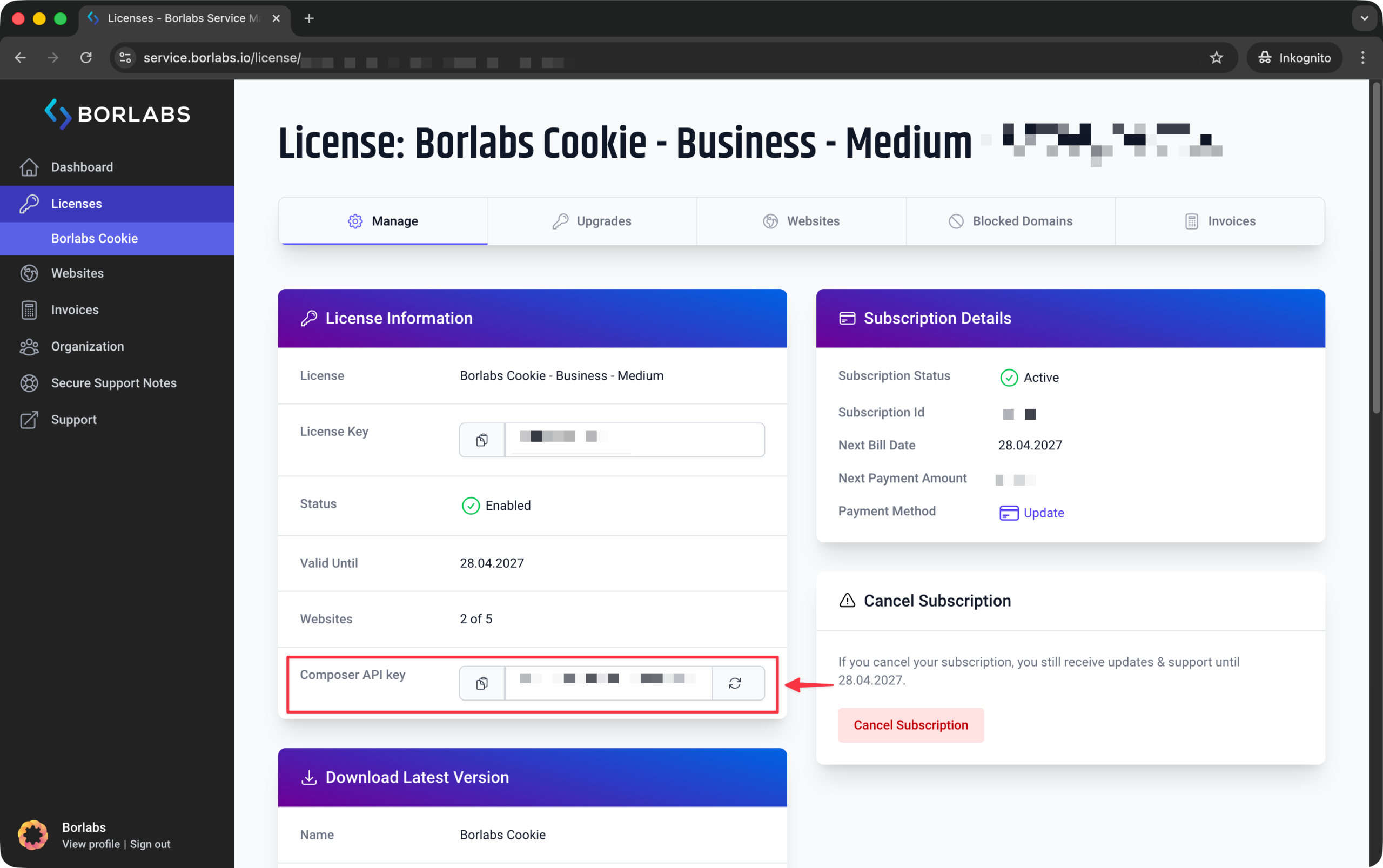
If an auth.json file does not already exist in the same directory as your composer.json file, create one with the following content:
{
"http-basic": {
"borlabs-cookie.composer.borlabs.io": {
"username": "irrelevant",
"password": "YOUR-COMPOSER-API-KEY"
}
}
}Replace the placeholder YOUR-COMPOSER-API-KEY with the Composer API key from the Borlabs Service Dashboard.
Once everything has been configured, running composer update should install the latest version of Borlabs Cookie.
Configuration for Each Plugin
Array & Object Syntax
Our examples use array syntax. If you prefer to use object syntax instead, you will need to adapt the examples accordingly.
Array
"require": {
"borlabs/borlabs-cache": "^1",
},
"repositories": [
{
"type": "composer",
"url": "https://borlabs-cache.composer.borlabs.io/composer"
}
]Object
"require": {
"borlabs/borlabs-cache": "^1",
},
"repositories": {
"borlabs-cache": {
"type": "composer",
"url": "https://borlabs-cache.composer.borlabs.io/composer"
}
}Borlabs Cache
composer.json:
"require": {
"borlabs/borlabs-cache": "^1",
},
"repositories": [
{
"type": "composer",
"url": "https://borlabs-cache.composer.borlabs.io/composer"
}
]Borlabs Cookie
composer.json:
"require": {
"borlabs/borlabs-cookie": "^1",
},
"repositories": [
    {
      "type": "composer",
      "url": "https://borlabs-cookie.composer.borlabs.io/composer"
    }
]auth.json:
{
  "http-basic": {
    "borlabs-cookie.composer.borlabs.io": {
      "username": "irrelevant",
      "password": "YOUR-COMPOSER-API-KEY"
    }
  }
}Borlabs Font-Blocker
composer.json:
"require": {
    "borlabs/borlabs-font-blocker": "^1",
},
"repositories": [
    {
      "type": "composer",
      "url": "https://borlabs-font-blocker.composer.borlabs.io/composer"
    }
]Borlabs Opt-in for WPForms
composer.json:
"require": {
    "borlabs/borlabs-opt-in-wpforms": "^1",
},
"repositories": [
    {
      "type": "composer",
      "url": "https://borlabs-opt-in-wpforms.composer.borlabs.io/composer"
    }
]auth.json
{
  "http-basic": {
    "borlabs-opt-in-wpforms.composer.borlabs.io": {
      "username": "irrelevant",
      "password": "YOUR-COMPOSER-API-KEY"
    }
  }
}Complete Composer Setup
This article only covers the additions required for an existing Composer setup.
If you are planning to start using Composer with WordPress, we recommend the following article: https://www.smashingmagazine.com/2019/03/composer-wordpress/